---
title: Adding and Removing Athletes from a List
description: To add an athlete to a List from the Search page: 1. Search for your athlete(s) 2. Select a single athlete OR multiple athletes by checking the box next to their name(s) or the box at the top 3. Sele
---
[Skip to content](https://coach-helpdesk.ncsasports.org/adding-and-removing-athletes-from-a-list#main-content)
English
Show submenu for translations

Open main navigation
Close main navigation
- English
Show submenu for translations
- Contact us
Contact us
How can we help you?
- There are no suggestions because the search field is empty.
1. [NCSA Coach Help Guide](https://coach-helpdesk.ncsasports.org/?hsLang=en)
2. [Getting started](https://coach-helpdesk.ncsasports.org/getting-started?hsLang=en)
# Adding and Removing Athletes from a List
**To add an athlete to a List from the Search page:**
1\. Search for your athlete(s)
2\. Select a single athlete OR multiple athletes by checking the box next to their name(s) or the box at the top
3\. Select **Add to List**
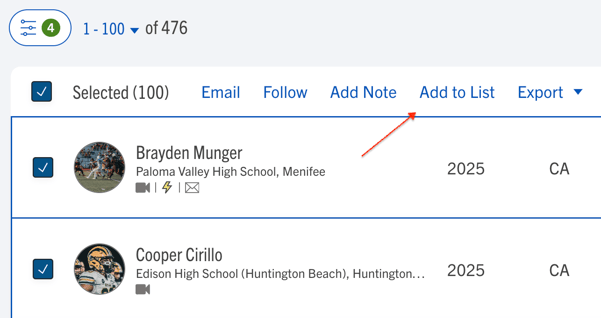
4\. From the dropdown select the list you would like to add the athletes to
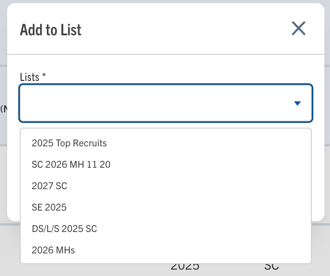
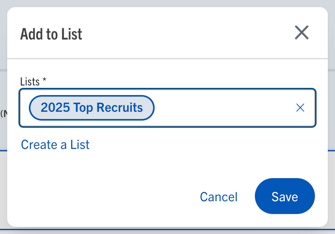
5\. Click Save
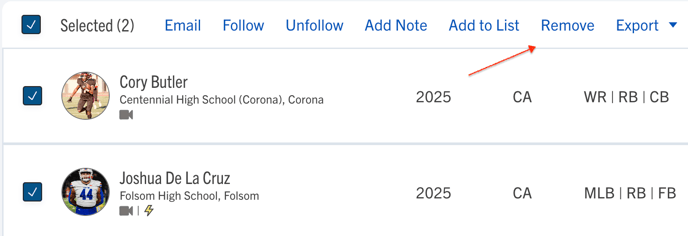
**How to remove athletes from a List:**
1. Select a single athlete OR multiple athletes by checking the box next to their name(s) or the box at the top
3\. Select **Remove**
****
**How to edit the name of a list or delete a list:**
1. To edit the name of a list or delete a list click the three dots next to a list on the List page

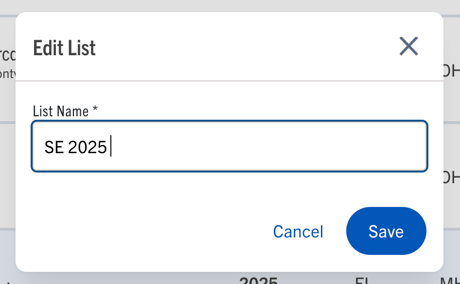
2\. By selecting Edit you can change the name of the list you've selected
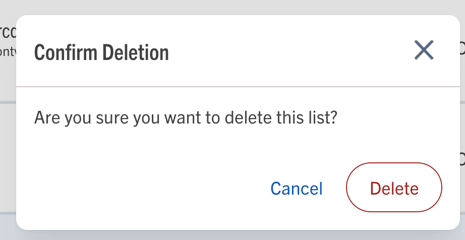
3\. If you select Delete from the dropdown, you will need to confirm the deletion, by clicking Delete
- [Getting started](https://coach-helpdesk.ncsasports.org/getting-started?hsLang=en)
- [Manage Staff](https://coach-helpdesk.ncsasports.org/manage-staff?hsLang=en)
- [Messaging](https://coach-helpdesk.ncsasports.org/messaging?hsLang=en)
- [Mobile Access](https://coach-helpdesk.ncsasports.org/mobile-access?hsLang=en#main-content)
- [Mobile](https://coach-helpdesk.ncsasports.org/mobile-access?hsLang=en#mobile)
- [NCSA Coach Training Webinar](https://coach-helpdesk.ncsasports.org/ncsa-coach-training-webinar?hsLang=en)
- [New Features](https://coach-helpdesk.ncsasports.org/new-features?hsLang=en)
- [Training Sessions](https://coach-helpdesk.ncsasports.org/training-sessions?hsLang=en)
[](http://frontrush.com)
[collegecoaches@ncsasports.org](https://coach-helpdesk.ncsasports.org/collegecoaches@ncsasports.org?hsLang=en)
[mailto:collegecoaches@ncsasports.org](mailto:collegecoaches@ncsasports.org)
Follow us on social!