---
title: How To Reset Your Password
description: " 1. Navigate to the login page: coach-x.ncsasports.org 2. Input your email address and select "Continue" 3. From the next screen select "Forgot Password?" 4. This will send you to a scre"
---
[Skip to content](https://coach-helpdesk.ncsasports.org/how-to-reset-your-password#main-content)
English
Show submenu for translations

Open main navigation
Close main navigation
- English
Show submenu for translations
- Contact us
Contact us
How can we help you?
- There are no suggestions because the search field is empty.
1. [NCSA Coach Help Guide](https://coach-helpdesk.ncsasports.org/?hsLang=en)
2. [Getting started](https://coach-helpdesk.ncsasports.org/getting-started?hsLang=en)
# How To Reset Your Password
**1. Navigate to the login page: [coach-x.ncsasports.org](http://coach-x.ncsasports.org)**
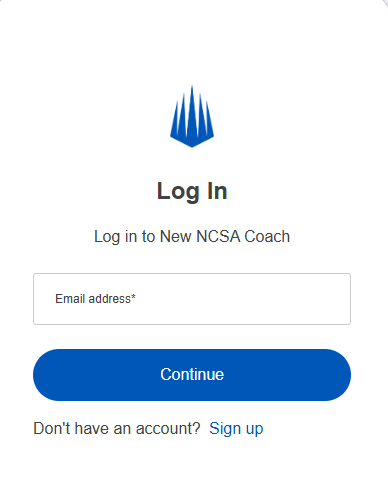
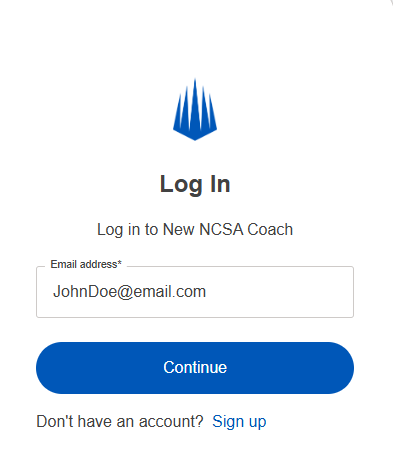
**2. Input your email address and select "Continue"**
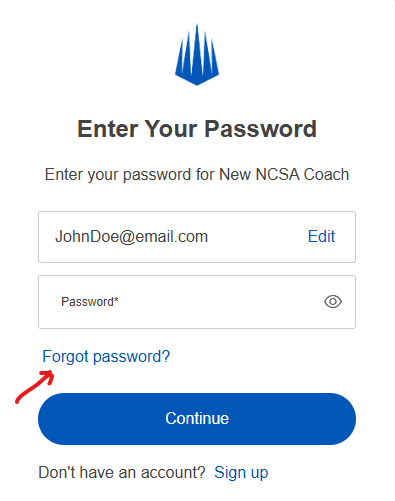
**3. From the next screen select "Forgot Password?"**
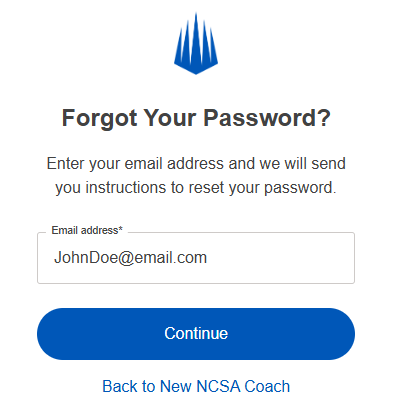
**4. This will send you to a screen to input your email a final time, click "Continue" and this will send an email to that address with instructions to reset your password.**
- [Getting started](https://coach-helpdesk.ncsasports.org/getting-started?hsLang=en)
- [Manage Staff](https://coach-helpdesk.ncsasports.org/manage-staff?hsLang=en)
- [Messaging](https://coach-helpdesk.ncsasports.org/messaging?hsLang=en)
- [Mobile Access](https://coach-helpdesk.ncsasports.org/mobile-access?hsLang=en#main-content)
- [Mobile](https://coach-helpdesk.ncsasports.org/mobile-access?hsLang=en#mobile)
- [NCSA Coach Training Webinar](https://coach-helpdesk.ncsasports.org/ncsa-coach-training-webinar?hsLang=en)
- [New Features](https://coach-helpdesk.ncsasports.org/new-features?hsLang=en)
- [Training Sessions](https://coach-helpdesk.ncsasports.org/training-sessions?hsLang=en)
[](http://frontrush.com)
[collegecoaches@ncsasports.org](https://coach-helpdesk.ncsasports.org/collegecoaches@ncsasports.org?hsLang=en)
[mailto:collegecoaches@ncsasports.org](mailto:collegecoaches@ncsasports.org)
Follow us on social!